


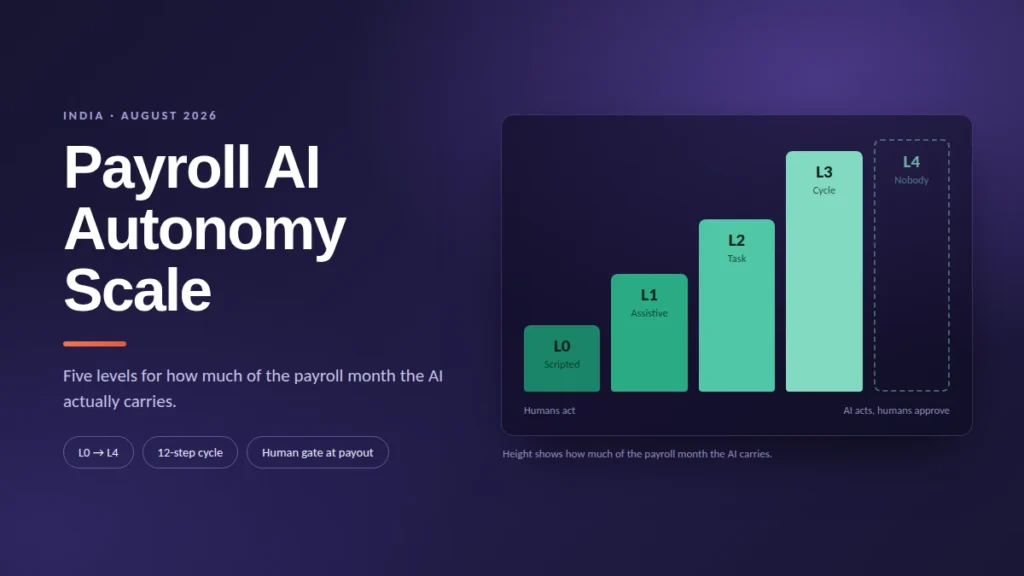
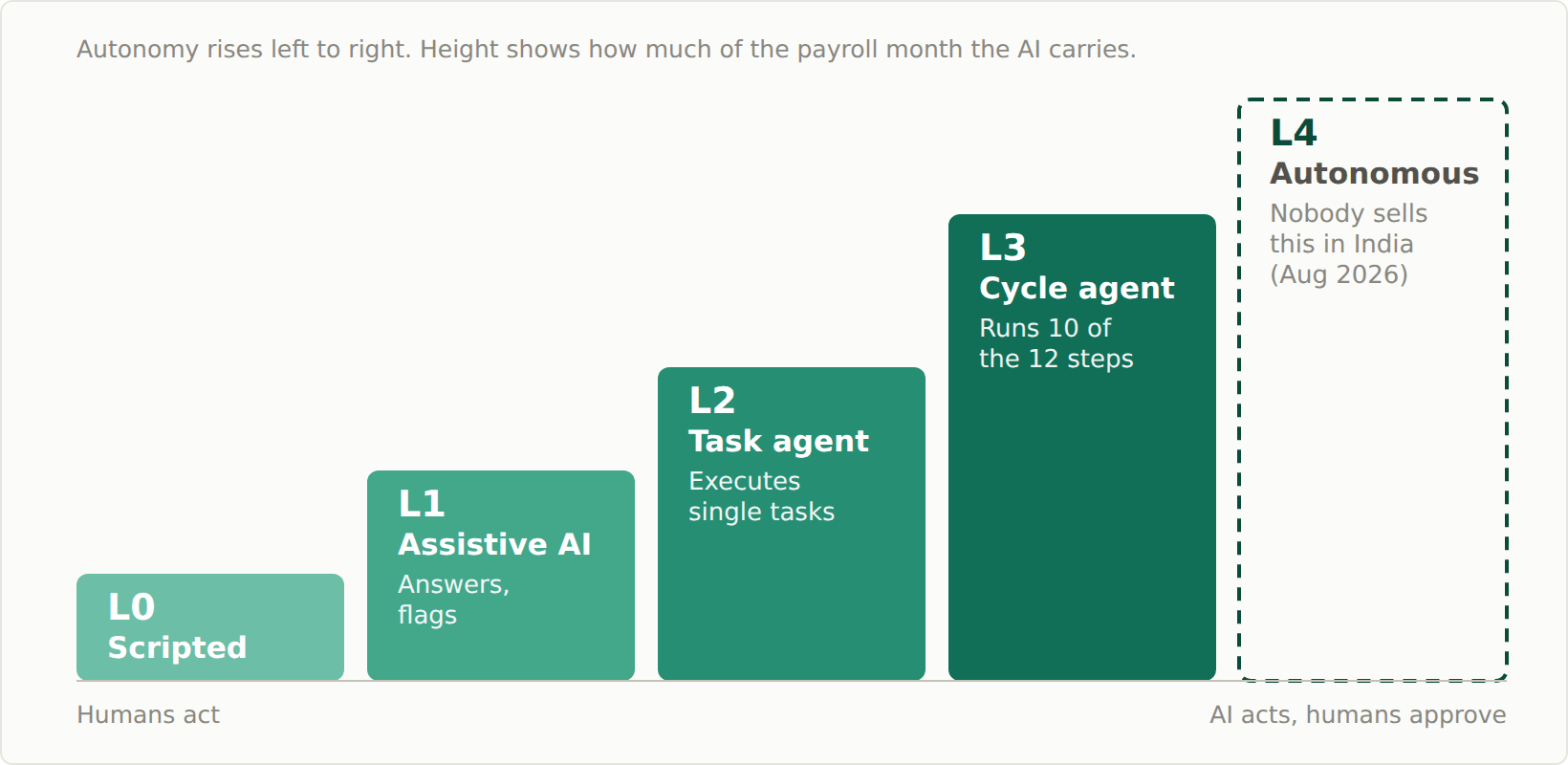
The Payroll AI Autonomy Scale classifies payroll software into five levels. L0: scripted automation — formulas and scheduled runs, no AI. L1: assistive AI — answers questions and flags anomalies; a human performs every action. L2: task-level agents — AI executes discrete tasks like attendance fixes, with approval. L3: cycle-level agents — AI runs ten of the twelve steps of the payroll month, stopping before payout and filing for human approval. L4: autonomous payroll — humans handle exceptions only. Of the ten leading platforms sold in India whose product pages and documentation we checked in August 2026, none documents an L4 system.
| Level | Name | What the AI does | Who acts |
|---|---|---|---|
| L0 | Scripted automation | Nothing — formulas, schedules, one-click runs | Humans, always |
| L1 | Assistive AI | Answers, explains, flags anomalies | Humans, on every action |
| L2 | Task-level agent | Executes discrete tasks (leave, attendance fixes) under permissions | AI acts; humans approve per task |
| L3 | Cycle-level agent | Runs 10 of the 12 cycle steps; stops before payout | AI drafts the cycle; humans approve payout and filings |
| L4 | Autonomous payroll | Owns the cycle without approval gates | AI, with humans on exceptions only |
The phrase “AI-powered payroll” now covers everything from a formula engine to a working agent, and vendor pages rarely say which one you’re buying. HR teams evaluating software need a shared vocabulary, and so do the people writing about it, including us at Kredily, where we build one of these agents. This page defines one. Use it to level the tool you already run and to decode the next vendor pitch that mentions agentic AI in HR. The demo checklist near the end turns the levels into questions you can put to a salesperson.
Why “AI-powered payroll” means five different things
Take one question employees actually ask, thousands of times, in support chats: “Why was net pay lower this month?”
A formula engine computed that lower figure correctly and silently. A chatbot can explain it — two days of loss-of-pay from unregularised attendance. A task agent can fix the cause: regularise those attendance entries, within policy, with the manager’s approval. A cycle agent can then re-run the payroll draft so the correction lands before payout. A hypothetical autonomous system would have done all of that before anyone asked.
Vendor pages rarely tell you which of these five machines they are selling. The definitions below are how to check.
The five levels
L0 — Scripted automation (no AI)
Deterministic rules: salary structures as formulas, scheduled payroll runs, one-click processing, payslip PDFs and the salary bank-upload file generated on schedule. Most of the reliability in payroll software lives here, and vendors are right to be proud of it. But nothing at L0 interprets a request or notices what it wasn’t programmed to check.
In an Indian payroll month: PF, ESI, PT and TDS are computed from configured rules. If an attendance sync quietly dropped three days for one employee, L0 pays the wrong amount in a perfectly formatted bank file.
Failure mode: silent garbage-in, garbage-out.
L1 — Assistive AI
AI reads; humans act. This level answers questions (“what is my leave balance”, “why did TDS increase”), explains payslips in plain language, and flags anomalies before a run: a salary input that doubled, attendance that contradicts the register. Useful, and the most common form of AI we found: four of the ten platforms we checked in August 2026 ship exactly this. Every correction and every run is still performed by a person.
In an Indian payroll month: the anomaly flag on that dropped attendance appears before the run. Whether anything happens depends on whether someone reads the flag in time.
Failure mode: alert fatigue: flags nobody acts on.
L2 — Task-level agentic execution
The AI performs discrete actions inside the product from a natural-language request: applies leave, regularises attendance, updates an employee record, files a reimbursement. It acts within the requester’s existing role permissions and routes through the same approvals a human action would. The payroll run itself is still human-driven; the agent handles the inputs feeding it.
In an Indian payroll month: “regularise Ravi’s attendance for the 12th and 13th” happens in one message instead of four screens, and a person still runs payroll afterwards.
Failure mode: scope confusion. An L2 agent marketed as “running payroll” fixes inputs and leaves the month to you.
L3 — Cycle-level agentic execution
The AI runs the payroll cycle up to the irreversible steps: it collects and validates inputs, computes salaries with attendance and leave, prepares statutory workings state-wise, drafts the run, and then stops at defined gates (payout release, filings) for explicit human approval. Every action is logged. The human role shifts from operator to approver.
A useful way to test any vendor’s claim here is to count steps. We break the recurring monthly cycle into twelve:
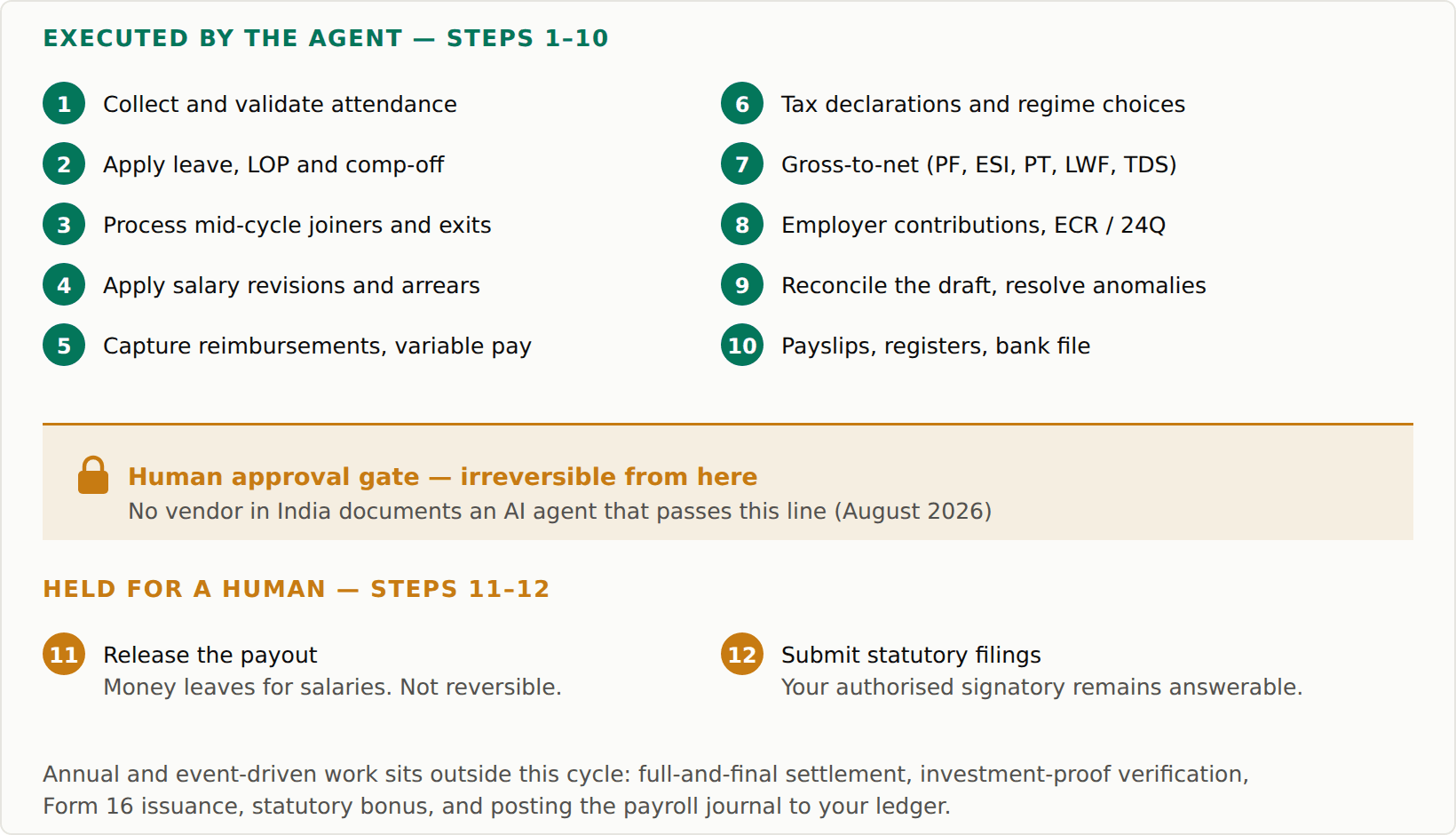
That is the monthly employee-payroll cycle. Annual and event-driven work sits alongside it and is not counted here: full-and-final settlement, investment-proof verification, Form 16 issuance, statutory bonus, and posting the payroll journal to your ledger.
An L3 agent executes steps 1 to 10 and stops at 11 and 12, the two irreversible ones. Ask a vendor which of the twelve their AI performs and where it stops; the answer is a level.
In an Indian payroll month: the agent assembles the month and presents it with inputs reconciled, anomalies resolved or escalated, PF/ESI/PT/TDS computed, Form 16 and 24Q workings ready. A person reviews and approves before any payout is released.
Failure mode: rubber-stamping. If approvers stop reading, the system is effectively running unsupervised without having been designed for it.
L4 — Autonomous payroll
The AI owns the cycle and raises exceptions; there is no approval gate on the run itself.
In an Indian payroll month: salaries go out and returns get prepared with no human sign-off unless the system decides something is unusual.
Failure mode: an unattended wrong payout, discovered by employees on salary day. This is why the failure cost of L4 is categorically different from L3’s — the gate is not a formality, it is the control.
We did not find an L4 system for sale in India. In August 2026 we checked the live product pages and documentation of ten leading platforms sold to Indian employers; the full list, with quotes and dates, is in our scored comparison. None documents an AI agent that releases a payout or submits a filing without human approval — including ours, which stops at step 10. Worth separating clearly: scripted, non-AI automation of statutory payment and filing does exist in this market and is genuinely valuable. A rules engine that files your PF challan on a schedule is doing something useful, and something different from an agent deciding to file.
One caveat you should weigh: the deepest capability we could document, an approval-gated L3, is our own product. Apply the same skepticism to that claim that this page recommends for every vendor, and ask any L4 claimant to show the audit trail of an unattended run.
The India statutory axis
“AI handles compliance” is the vaguest claim in this category. For each obligation, ask which verb the software performs. Computing a liability, preparing the return, chasing the deadline, and executing the payment or filing are different jobs at different levels, and legal responsibility belongs to none of them.
| Obligation | Compute | Prepare | Chase deadline | Execute payment/filing |
|---|---|---|---|---|
| PF | Employee and employer contributions against the ₹15,000 monthly wage ceiling — L0 arithmetic | ECR text file generated for the EPFO portal — L0 output; an L3 agent has it drafted and reconciled before you ask | L1+ flags the monthly due date; an L3 agent escalates an unfiled ECR | Some platforms execute PF payment from the product; verify whether yours files or only prepares |
| ESI | 0.75% employee and 3.25% employer, for staff below the coverage ceiling (rates in force since July 2019) — L0 | Monthly contribution data generated for the ESIC portal — L0 output; an L3 agent reconciles it against attendance before you ask | L1+ flags the monthly due date | Same verification: payment execution exists in the market; confirm it in the demo |
| PT (state-wise) | Slab per state — L0, but multi-state slab maintenance is where errors hide | State-wise challans and registers generated per registration | L1+ flags per-state due dates — these are the deadlines that slip most | Mostly manual per state portal; ask specifically |
| TDS (24Q / Form 16) | Monthly TDS per declaration and regime — L0 | 24Q workings with FVU validation; Form 16 generation via TRACES after filing | L1+ flags quarterly windows | 24Q is filed through the Income Tax e-filing route or an intermediary; several products execute this — ask who is named as the signatory |
Two readings of that table. First, computation is a solved L0 problem, so “AI-powered PF calculation” describes arithmetic. Second, execution of payments and filings is automatable and some products do automate it. The authorised signatory, and the liability, stay with your organisation whatever the software executes. The useful question for a vendor is which of these verbs their product performs, and who is named as signatory when it does.
Two figures anchor that table and are worth stating plainly: the PF wage ceiling has been ₹15,000 a month since 2014, and the ESI split has been 0.75% employee and 3.25% employer since July 2019. Both are correct as of August 2026, and the PF ceiling is the one most likely to move — raising it has been under discussion for years. Check EPFO and ESIC before you rely on either for a filing. Everything else in the table is a verb rather than a rate, on purpose: which job the software does for you doesn’t change when a slab does.
Governance: what has to stay human
We ship an L3 agent, so this section describes design choices we actually made, and it is fair to read it knowing that. Three of them mattered more than any model choice.
Reversibility. Generating a report is reversible. Releasing a payout or submitting a return is not, so those pause for explicit human approval. The pause is built into the product; an administrator cannot switch it off. This is also the reason we stopped at L3: no accuracy rate justifies automating away the last check before money leaves for salaries.
Permissions. An agent acting for a user can do only what that user’s role already allows. If a vendor’s AI layer can exceed its requester’s permissions, treat that as an access-control defect in your security review.
Audit logging. Agent actions land in the same audit trail as human actions, so an auditor can reconstruct what the AI did and who approved it. Both questions should be answerable from the log alone, without asking the vendor.
One honest limit: gates and logs control process risk. They do not make the AI’s judgment perfect — an agent can misread an instruction or a policy, which is precisely why irreversible steps keep a human in front of them.
How to level a vendor in one demo
Ask in order. The vendor’s level is the last question they pass.
- Beyond formulas and schedules, does the AI do anything? (Pass → at least L1.)
- Can it act, or only answer and flag? (Acts → candidate L2. Ask them to run one live: “regularise this attendance entry.” Watch whether it executes or explains how you could.)
- Can it run the month? Ask to see a payroll cycle it assembled, and walk the twelve steps above: which does it execute, and where does it stop? (Runs the cycle to the gates → L3.)
- What happens if nobody approves? If the answer is “it proceeds”, you are being shown an L4 claim — ask for the audit trail of an unattended run and ask how statutory signatures are handled.
Two follow-ups at any level: is the AI included in my plan or priced and gated separately, and show me the audit log of what the agent just did.
Decoding the marketing
| The phrase on the vendor page | What it usually means |
|---|---|
| “AI-powered calculations” | L0 arithmetic |
| “Smart payroll” / “intelligent automation” | L0, occasionally L1 |
| “AI assistant” / “copilot” / “chatbot” | L1 — unless it demonstrably acts, then L2 |
| “Agentic AI” | Anything from a renamed chatbot to a real L2–L3 agent. Run the demo checklist above to find out which |
FAQ
Is agentic AI payroll the same as payroll automation?
No. Automation (L0) executes rules someone configured in advance; an agent (L2–L3) interprets a request it has never seen and chooses actions under permissions and approvals. Many products have excellent automation and no agency at all.
Is it safe to let AI run payroll?
At L3 with real gates, the risk is manageable and mostly human. Inherited permissions, hard stops on irreversible actions and full audit logging mean the AI drafts and a person approves. Two risks remain: approvals given without reading, and the agent misinterpreting an instruction or policy; the gate is there for both. Before taking any vendor’s word for it, ask to see the audit log of something the agent just did.
Can AI file my PF, ESI or TDS returns?
Software — AI or scripted — can prepare all of them and can execute some payments and filings, depending on the product. What it cannot take from you is signatory responsibility: the authorised signatory your organisation registered remains legally answerable for every return, however it was filed. Ask each vendor which specific filings it executes versus prepares, and whose name goes on the return when it does.
Which level do I actually need?
Under ~25 employees with a simple structure, L0–L1 usually suffices. The case for L2–L3 grows with input volume: attendance disputes, mid-cycle revisions, multi-state PT, arrears. In our own support corpus of 4,958 SMB conversations (2023–2026), the four biggest topics were payroll (1,081 chats), product configuration (813), attendance (809) and leave (767). Three of those four are the input-coordination work L2–L3 agents absorb.
See the scale applied to ten named products: Top 10 AI payroll software in India, scored L0–L4. Kai, Kredily’s payroll agent, is the L3 entry — with an administrator’s permissions granted it executes ten of the twelve steps inside Kredily’s payroll platform; you approve it. Statutory deadlines and filings live on the compliance page.